How to use digital tools to stay safe online
In today’s digital world, staying safe online is more important than ever. Traditionally, we’ve been told to rely on our wits to stay safe online, but with cybercrime becoming ever more sophisticated, this advice is becoming less relevant (to say nothing for how little it helps the most vulnerable people in our society). Thankfully, as ‘keep your wits about you’ becomes less capable of keeping us safe from cybercrime, technology can step into the gap.
This blog post looks at a few digital tools – some older, some new – and thinks about how we can use tech to make being connected safer. Whether you are a digital native, or just getting started with the first steps in your online safety journey, here are some useful tools that can help you use the internet safely and confidently. All of these tools are free to use.
Many thanks to guest-blogger Michael Chamberlain of Lead Scotland, for contributing this content which is based on a workshop delivered at the Digital Youth Work Conference 2025.
Tools to boost your password security
When it comes to staying safe online, one of the most important things you can do is to make sure you have a strong password. The National Cyber Security Centre advise the best way to do this is to put three random words together, such as “HoopGrilledBed”.
But even then, it can be difficult to know whether you have created a strong enough password. Thankfully, security.org have created a password strength checker that lets you check how strong your passwords are. This is a great tool for getting started with thinking about staying safe online, so you can use to check the strength of your own personal passwords. The passwords you enter aren’t stored or shared.
Tools to help you decide if a website is trustworthy
Sadly, some websites are there to do you harm. They might be designed to steal your data, infect your device with malware, or do both at once. A website checking tool can help you to decide if a website is trustworthy or not, before you click on the link. Website reputation checkers such as URLVoid let you copy and paste the URL (that’s the bit in the search bar that shows you the address of the website) into their checker. URLVoid will check the URL you’ve entered, and create a table showing information about the website. Near the top of this table, you will see a statistic called “Detection Counts”, which shows the number of times the website has been flagged as potentially dangerous by a range of cybersecurity companies. The only safe number here is 0. If it has a detection count of 1 or higher, it is not a safe website.
This means it may be a fraudulent or malicious website, or it may be a genuine website with poor security features that leaves anyone who visits it vulnerable to attackers. You should never visit an unsafe website, even if you have antivirus software.
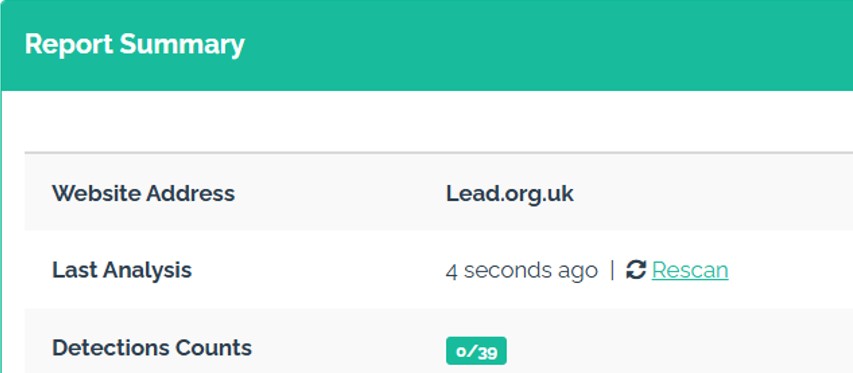
This is the report summary for Lead Scotland’s website. You can see that the detection counts score is 0 out of 39. This means the website is safe to use.
This is the report for an unsafe website called Modern Homes:
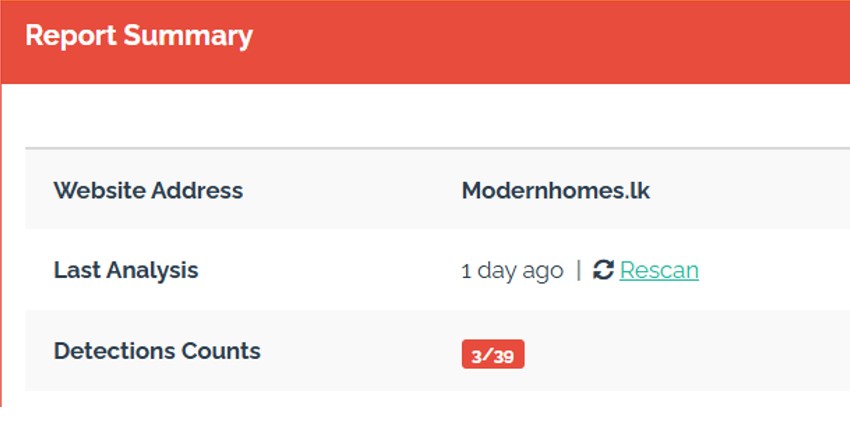
You can see that it has a detection count of 3 out of 39 – three separate cyber security companies have flagged this as unsafe. As the only safe number of detection counts is 0, we can safely say this is a scam website.
Scam checking tools
We’ve probably all received a text or “missed delivery” email from what appears to be Royal Mail, or another courier, that turned out to be a scam. Messages about missed parcels or deliveries are common, often asking you to click on links and enter your details to reschedule the delivery. With many of us doing a fair amount of our shopping online, these scams can be very convincing because we may be expecting something similar from a legitimate source.
Scam checkers such as Ask Silver can flag suspicious emails, websites, or leaflets. For example, if the domain name at the link you’re being asked to visit doesn’t match the company the message is claiming to be from, Ask Silver can flag this as a scam.
To check a potential scam with Ask Silver, you send a photo (if it’s a physical item, such as a missed delivery card with a QR code) or a screenshot (for emails or texts) via WhatsApp to Ask Silver. Ask Silver identifies any red flags and gives you suggestions on what to do next to stay safe.
Here is an example:
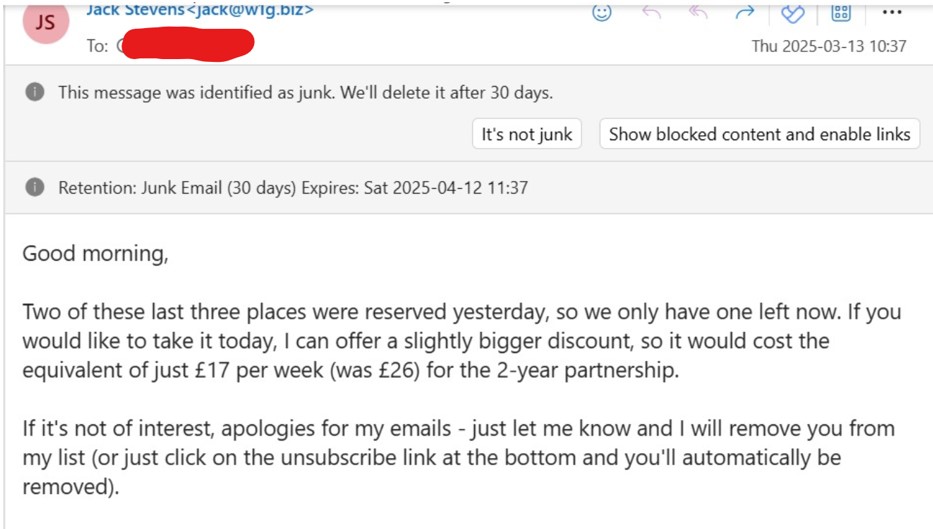
This was sent to Ask Silver, and seconds later they provided this response:
‘A few things to look out for:
- The email offers a large discount, which might be too good to be true, from £26 to £17 per week.
- It creates urgency by claiming there’s ‘only one left now,’ a classic tactic often used in scams.
- The email was flagged as junk mail, suggesting it could be untrustworthy.
Stay cautious and double-check before taking any action.
Remember, Ask Silver is a free tool to be used alongside your own research and best judgement.’
Find out if your login details have been stolen
When you make an account with a website, you are giving that website some of your data (at least an email address and password). But you have no control over how securely that website manages your data. And even if they manage your data well, they can still be the victim of a cyber attack. And when this happens, your data is at risk – cyber criminals can steal login credentials, and use these to try and access other accounts. If you reuse your passwords across accounts, then one small data breach can lead to a host of problems for you, with cyber criminals gaining access to any other account you use that has that password.
But checking if your email address has been compromised in a data breach or sold on the dark web can help you to be alert for scams and know when to update your login credentials.
HaveIBeenPwned.com collects information on breaches and allows people to discover where their data has been leaked. By entering your email address into the tool’s search bar, you can check if any accounts associated with that email address have been exposed in a data breach. If they have been, you need to change the password for any affected accounts, and be on high alert for scams being targeted towards you.
Tools for tackling non-consensual intimate images online
The non-consensual sharing of intimate images online can be devastating for the victims involved. It can be very difficult to tackle alone, especially if the images are shared in many places online. Tools such as StopNCII and Report Remove allow people to get some control over their intimate images.
StopNCII, run by the Revenge Porn Helpline, works by creating a ‘hash’ or code from your intimate image or video. An image hash is created using an algorithm to assign a unique hash value to your image file. Any duplicate copies many of the image will have the same hash code – a bit like a digital fingerprint. StopNCII shares the hash code (but not your image) with participating companies, including Facebook, Tik Tok, Instagram, PornHub, Reddit, and more. These companies help detect and remove the images with your hash code. StopNCII.org does not download the images from your device, but be aware of fake StopNCII website scams that ask you to share or upload your images.
StopNCII is designed for people over the age of 18. For under 18s, other tools such as Report Remove can help.
Report Remove is run by Childline. It helps people under 18 in the UK to report sexual images and videos of themselves online and have them removed from the internet. It is against the law to share a sexual image or video of anyone under 18. Report Remove report the image or video to the Internet Watch Foundation (IWF) who, along with Yoti, work to get the image taken down. Young people can also speak to a Childline counsellor for support.
Tools for General Digital Upskilling
There are loads of other ways to stay safe online, from learning how to use two-factor authentication, to knowing how to spot fake news. We cover these topics and many more over on my.lead, our free online learning platform. We have over 20 free cyber courses available, and more coming all the time.
Lead Scotland has also developed a useful tool to help manage huge number of things we’re expected to remember when it comes to staying safe online. On digital.lead, we have a series of checklists covering 59 crucial steps to keep your accounts, devices, and home network safe. You can use this to audit your current cyber skills, and you can upskill any gaps through courses on my.lead.
Finding new tools
When it comes to staying safe online, things can move so quickly that what it relevant today may be redundant tomorrow. The tools above are helpful, but not an exhaustive list, and new tools are always being developed to protect us against the ever-evolving cyber threat landscape. Here are some top tips for making sure that you stay safe while investigating new tools:
- Check any website you are visiting is legitimate (use URLVoid)
- Only download apps through your official App Store – these have a degree of cyber security built into them, whereas just downloading something from the wider internet has no checks involved.
- Check reviews on your app store – if the reviews are largely negative (or if there are hardly any reviews at all), it is not worth taking the risk, or becoming the human guinea pig. Only download apps with plenty of good reviews.
- Check trusted sources for their opinion.
- And finally, remember that these tools are an extra layer of protection, rather than a failsafe. Technology can do a lot to help us stay safe online, but we still need to be aware of potential risks.
If you are interested in finding out more about using digital tools to stay safe online, please contact cyberproject@lead.org.uk